Tuesday, 25 October 2016
Lucky Patcher For Android
Description
Lucky Patcher is a great Android tool to remove ads, modify Permissions, bypass premium applications license verification, and more.
To use this application, you need a rooted device.
Know:
Although stable, functioning of Lucky Patcher can't be guaranteed at 100%.
So you are solely responsible of use of this application.
Under no circumstances Netbew be responsible for any problems caused to your device (rebooting loop, unstable system, etc...).
Lucky break LuckyPatcher from cracking the ChelpuS work, need root permissions can solve some software or games, also can go to advertising, such as TankRiders, Reckless Racing HD? Ground Effect HD, Spirit, Aftermatch and so on, but there's no guarantee that will break, so called lucky break, apply after long press Popup the menu.
Note: when faced with a lucky break before the wreck some update version out of space to remind, to the corresponding app uninstall, and then run the luckyautomatically clear the data after installation
Click Here To Download

Monday, 3 October 2016

How To Use Whatsapp With USA Num
Getting a working U.S.A number to use on Whatsapp has been a great deal
for most of us but the tutorial that follow will make it easy .
Going straight to the point ....
Step 1:
Download VOXOX for IOS or Android Register with your local number and email
Step 2:
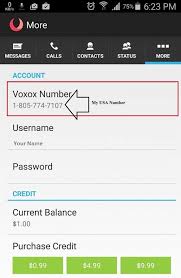
As you have registered for the app to more at the top right side in the app .
You will see your U.S.A number as voxox number, write it somewhere or keep it I your head.
Step 3:
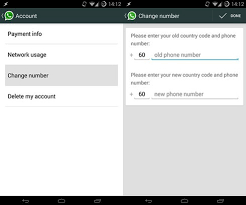
At this point you just have to open whatsapp go to setting>>account>>change number.
Tap on the next at the top right corner and place your old number and new number ( this method will make the change in all the Whatsapp groups you are already in and will push your old number out of Whatsapp .... use the next one if you don't what this )
--- if you are not interested in the above step follow this ---
Uninstall you Whatsapp and reinstall again but while registering use the USA number instead of your local number and wait for your authentication code which is supposed to be automatic .
If it does not happen automatic but instead takes too long to arrive, request for call verification but instead of waiting for the call put in the code from the message in voxox which Whatsapp sent into the code space in Whatsapp .... this will verify the number hence you get to USA number on Whatsapp in your country.
Going straight to the point ....
Step 1:
Download VOXOX for IOS or Android Register with your local number and email
Step 2:
As you have registered for the app to more at the top right side in the app .
You will see your U.S.A number as voxox number, write it somewhere or keep it I your head.

Step 3:
At this point you just have to open whatsapp go to setting>>account>>change number.
Tap on the next at the top right corner and place your old number and new number ( this method will make the change in all the Whatsapp groups you are already in and will push your old number out of Whatsapp .... use the next one if you don't what this )
--- if you are not interested in the above step follow this ---
Uninstall you Whatsapp and reinstall again but while registering use the USA number instead of your local number and wait for your authentication code which is supposed to be automatic .
If it does not happen automatic but instead takes too long to arrive, request for call verification but instead of waiting for the call put in the code from the message in voxox which Whatsapp sent into the code space in Whatsapp .... this will verify the number hence you get to USA number on Whatsapp in your country.
Wednesday, 21 October 2015
DOWNLOAD TEMPLE RUN FOR ANDROID

With over 170 million downloads, Temple Run redefined mobile gaming. Now get more of the exhilarating running, jumping, turning and sliding you love in Temple Run 2!
Navigate perilous cliffs, zip lines, mines and forests as you try to escape with the cursed idol. How far can you run?!
FEATURES
★ Beautiful new graphics
★ Gorgeous new organic environments
★ New obstacles
★ More powerups
★ More achievements
★ Special powers for each character
★ Bigger monkey!!!
CLICK HERE TO DOWNLOAD
How to Factory Reset Your Android Phone or Tablet When It Won’t Boot OR How To Unlock Pattern In Android

Safe mode can help you troubleshoot your Android, but sometimes you’ll need to wipe everything and restore your device to its factory state. You can even perform a factory reset when your Android phone or tablet won’t boot normally.
Ensure you have any important data backed up before doing a reset. This includes your Google Authenticator credentials, which will be lost during the reset. Disable two-factor authentication on your accounts first or you’ll experience some trouble afterwards.
If You Can’t Boot
If safe mode doesn’t help fix your device, you can perform a hard reset by booting into a special recovery mode. First, ensure your device is fully shut down.Press and hold the correct keys to boot the device into recovery mode. This will vary from device to device. Here are some examples:
- Nexus 7: Volume Up + Volume Down + Power
- Samsung Galaxy S3: Volume Up + Home + Power
- Motorola Droid X: Home + Power
- Devices With Camera Buttons: Volume Up + Camera
If your device isn’t on this list and none of the above methods work, do a Google search for the name of your device and “recovery mode” – or look in the device’s manual or support pages.
Release the buttons when the device powered on. You’ll see an image of an Android lying on its back with its chest open and its internals revealed.

Press the Volume Up and Volume Down keys to scroll through the options until you see Recovery mode on the screen.

Press the Power button to restart into recovery mode. You’ll soon see an Android with a red triangle.

Hold down the Power button and tap Volume Up. You’ll see the Android system recovery menu appear at the top of your screen.

Select wipe data / factory reset with the volume keys and tap the Power button to activate it.
Select Yes – erase all user data with the volume buttons and tap Power. Your device will be reset to its factory state and all your data will be erased.

If your device freezes at any point, hold down the Power button until it restarts.
THanks Keep Visiting Daily
XPOSED INSTALLER FOR LOLLYPOP 5.0/5.1x
Please
install it only if you're willing to take the risk of boot loops. Just
because it's working fine and stable for me doesn't mean it will work
for everyone the same way. 
Downloads:
xposed-v*-sdk*-*.zip: Must be flashed with a custom recovery to install the framework.
XposedInstaller_3.0-alpha*.apk: Must be installed to manage installed modules
No, it's not using material design yet. Yes, there are more important topics for now.
XposedBridgeApi-20150213.jar: The API for module developers, in case they want to make use of some new features. Might be changed slightly until the stable release!
Known issues:
- Bootloops on Samsung stock ROMs. That's due to Samsung's changes to ART. There are unofficial builds that work around this by deodexing and adjusting the ROM.
- Sony seems to have shipped some ROMs with corrupted services.odex (the embedded .dex is invalid). Those ROMs will bootloop with a "Fatal signal 6" or "No pending exception expected: java.lang.ArrayIndexOutOfBoundsException" error, which I unfortunately cannot fix.
Downloads:
xposed-v*-sdk*-*.zip: Must be flashed with a custom recovery to install the framework.
XposedInstaller_3.0-alpha*.apk: Must be installed to manage installed modules
No, it's not using material design yet. Yes, there are more important topics for now.
XposedBridgeApi-20150213.jar: The API for module developers, in case they want to make use of some new features. Might be changed slightly until the stable release!
Known issues:
- Bootloops on Samsung stock ROMs. That's due to Samsung's changes to ART. There are unofficial builds that work around this by deodexing and adjusting the ROM.
- Sony seems to have shipped some ROMs with corrupted services.odex (the embedded .dex is invalid). Those ROMs will bootloop with a "Fatal signal 6" or "No pending exception expected: java.lang.ArrayIndexOutOfBoundsException" error, which I unfortunately cannot fix.
Subscribe to:
Posts (Atom)